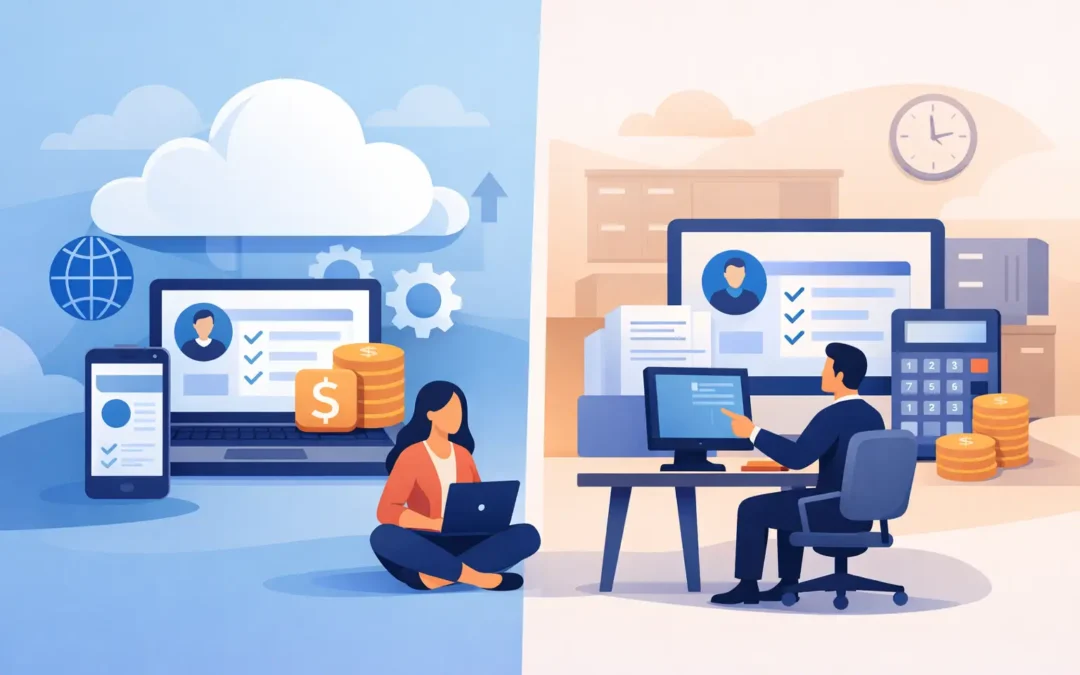
Payroll is one of the few business processes where a delayed update, missing approval, or incorrect calculation can affect every employee at once. The choice between cloud payroll vs desktop payroll therefore goes beyond software preference. It determines how your team accesses payroll data, manages compliance changes, protects sensitive records, and keeps work moving when the payroll administrator is not at a single office computer.
For small and midsize businesses, the right answer depends on operational needs, internal controls, internet reliability, workforce structure, and the level of integration required with accounting and HR processes. Cloud and desktop systems can both support accurate payroll. Their practical differences appear in the daily work around payroll.
Cloud Payroll vs Desktop Payroll: The Core Difference
Desktop payroll software is installed and operated on a specific computer or local network. The business generally controls where the data is stored, when the system is updated, and who can access it from the office. This model can work well for a stable, location-based team with established internal IT procedures.
Cloud payroll is hosted in a secure online environment and accessed through a web browser or supported application. Authorized users can work from different locations, subject to role permissions and internet access. Updates, backups, and platform maintenance are typically handled centrally by the software provider.
The distinction sounds simple, but it affects responsibilities. With desktop payroll, the business carries more responsibility for hardware, backups, updates, and remote-access arrangements. With cloud payroll, the provider manages more of the underlying platform, while the business remains responsible for user permissions, approval discipline, and data accuracy.
Access and Workflow Control
The strongest operational advantage of cloud payroll is controlled access from wherever authorized work takes place. A payroll administrator can review attendance inputs from home, a department manager can approve claims from another branch, and finance can check payroll costs without waiting for a file to be transferred by email or USB drive.
This matters when payroll involves more than basic monthly wages. Growing companies may need managers to validate overtime, HR to update employee records, finance to reconcile payroll costs, and business owners to review summaries before payment. A cloud platform can keep these steps in one shared environment, with permissions that limit each user to the information and actions relevant to their role.
Desktop payroll provides a different type of control. Data can remain within the office network, and some companies prefer that physical proximity for sensitive employee information. It can also be practical when one experienced payroll officer handles the full process and works from a fixed location.
However, control should not be confused with convenience. If payroll files must be copied between computers, sent for review, or accessed through informal remote-desktop arrangements, the process can become dependent on one device and one person. That creates avoidable risk during leave, turnover, hardware failure, or urgent corrections.
Compliance Updates Need a Clear Owner
Payroll compliance is not static. Tax rules, statutory contribution requirements, reporting formats, and employment policies can change. The immediate question is not simply whether a system has the right calculation formula today. It is who identifies the change, applies the update, tests it, and confirms payroll remains correct.
In a cloud model, software updates are commonly deployed centrally. This can reduce the administrative burden on internal teams and help ensure all users are operating on the same version. For businesses that operate across multiple sites, this consistency is especially valuable.
With desktop payroll, updates may need to be downloaded and installed on each relevant machine or server. A disciplined IT and payroll team can manage this effectively. But where software maintenance is delayed, businesses risk running outdated program versions during critical payroll periods.
Neither approach removes the need for payroll review. Software can apply configured rules, but it cannot independently verify that employee master data, pay rates, allowances, deductions, time records, or approvals are correct. Strong payroll control still requires defined ownership, cut-off dates, exception checks, and approval records.
Security Is About Process, Not Just Location
Some businesses assume desktop payroll is inherently safer because data sits on a local computer. Others assume the cloud is safer because the provider manages infrastructure. Both assumptions are incomplete.
Desktop security depends on the business protecting devices, servers, operating systems, local networks, backups, and physical access. A laptop failure, ransomware incident, or poorly managed shared password can expose payroll data or interrupt processing. Local backups are essential, but they must be tested and stored securely rather than treated as an afterthought.
Cloud security depends on the provider’s infrastructure and the business’s access practices. Look for role-based permissions, multi-factor authentication, encrypted connections, audit trails, backup procedures, and clear policies for incident response. Internally, businesses should remove access promptly when staff leave, restrict sensitive reports, and avoid using shared accounts.
The more useful question is: which environment can your business govern consistently? A well-managed desktop system can be secure. A poorly managed cloud account can be exposed. The best model is the one supported by clear responsibilities and repeatable controls.
Cost: Compare the Full Operating Cost
Desktop payroll may involve an upfront software license, implementation services, annual support, upgrade costs, hardware, backup storage, and internal IT time. These costs can be predictable for a business with existing infrastructure and limited change requirements.
Cloud payroll is commonly priced through recurring subscriptions, often based on users, employees, modules, or service levels. This can reduce upfront infrastructure expense and make it easier to scale as headcount or locations increase. It can also shift spending from capital expenditure to operating expenditure.
The comparison should include the cost of workarounds. If a desktop process requires staff to manually consolidate attendance data, email reports for approval, maintain duplicate employee records, or call IT whenever remote access is needed, the software fee does not represent the full cost. The same principle applies to cloud systems: paying for features that are never configured or adopted does not create value.
Integration Often Decides the Outcome
Payroll is closely connected to accounting, HR, time attendance, expense claims, banking, and management reporting. The more disconnected these systems are, the more likely teams are to rekey data, work from inconsistent records, and spend time resolving differences after payroll has been processed.
A cloud payroll platform can be a strong fit when a business needs connected workflows across branches, mobile teams, or multiple operational systems. Real-time access can help finance and HR work from current data, provided integrations are properly configured and monitored.
Desktop payroll can remain effective when payroll is relatively self-contained, transaction volumes are stable, and accounting export procedures are reliable. Yet it may become restrictive as the business adds remote staff, additional entities, new locations, or more complex approval requirements.
Before selecting either model, map the payroll journey from employee data entry through approval, payment, accounting posting, and reporting. This exercise often reveals whether the real issue is deployment type or a fragmented process that needs redesign.
When Desktop Payroll Is the Better Fit
Desktop payroll may be the practical choice for a business with a single site, dependable local IT support, limited remote-work requirements, and a preference for maintaining data on its own infrastructure. It can also suit organizations with specific legacy integrations that are costly or impractical to replace immediately.
The key is to maintain it deliberately. Document backup and recovery procedures, keep software current, limit access by role, test restoration regularly, and establish a contingency plan for the payroll administrator’s absence. A desktop system should not become a single point of failure.
When Cloud Payroll Is the Better Fit
Cloud payroll is often better suited to businesses that need access across locations, faster collaboration between HR and finance, centralized updates, and easier scalability. It is particularly relevant for companies with branch operations, hybrid teams, multiple approvers, or a broader software ecosystem that includes accounting, employee management, and operational reporting.
It can also reduce dependency on local hardware. If an office computer fails near payroll cut-off, authorized users can continue working from another secure device. That continuity can be more valuable than it appears until the first time it is needed.
A successful move to the cloud still requires preparation. Clean up employee records, define user roles, confirm approval workflows, validate opening balances and year-to-date figures, and train the people responsible for each step. Technology improves payroll operations when the underlying process is ready to use it.
Make the Decision Around Your Next Three Years
Do not choose solely for this month’s payroll run. Consider what will change over the next three years: headcount, branches, remote work, reporting expectations, compliance workload, and the need to connect payroll with the rest of the business.
A payroll system should give your team confidence at cut-off time, not create a monthly dependency on manual fixes and individual knowledge. Start by identifying where payroll work slows down, where data is re-entered, and where access is too limited or too broad. The right deployment model becomes clearer when it is measured against the way your business actually operates.